What is HTML to Markdown Converter?
Professionals who handle text files on a daily basis recognize the massive friction between rendering web pages and editing raw documents. Web pages rely on Hypertext Markup Language. This formatting tells internet browsers how to display information visually, determining everything from text alignment to column width. It requires a heavy, repetitive structure of opening and closing tags. Computers process these tags without issue. Humans find them distracting and difficult to read. Markdown was invented specifically to bypass this readability problem. It relies on standard keyboard symbols to format text, keeping the document clean and legible even in its unrendered state.
 Professionals who handle text files on a daily basis recognize the massive friction between rendering web pages and editing raw documents. Web pages rely on Hypertext Markup Language. This formatting tells internet browsers how to display information visually, determining everything from text alignment to column width. It requires a heavy, repetitive structure of opening and closing tags. Computers process these tags without issue. Humans find them distracting and difficult to read. Markdown was invented specifically to bypass this readability problem. It relies on standard keyboard symbols to format text, keeping the document clean and legible even in its unrendered state.
Moving text from a live website back into a local text editor creates immediate problems. Copying text directly off a screen drags along a massive amount of hidden background code. You paste it into your workspace and immediately face a mess of invisible styling rules, rigid structural elements, and erratic line breaks. HTML to Markdown Converter fixes this exact workflow breakdown. It operates as a direct translator between these two distinctly different formats. By stripping away the bloated web code, it leaves you with a pristine text document. When you need to convert html to markdown, HTML to Markdown Converter reads the underlying code of your source material, identifies the meaningful text blocks, and maps them directly to their corresponding Markdown symbols.
Swapping one tag for another sounds easy in theory. The reality of modern web development makes this a highly complex technical challenge. Modern websites rely on complicated frontend frameworks that inject hundreds of nested tags just to render a single paragraph. HTML to Markdown Converter cuts right through this digital noise. It extracts only the textual content you actually care about and formats it correctly for your archives.
The Mechanics of Translating Tangled Web Code
Understanding the underlying translation process reveals exactly why manual editing is a waste of time. Poorly written scripts try to rely on simple find-and-replace commands to change formatting. They search a document for a bold tag and swap it with two asterisks. That primitive method fails the moment it encounters a real-world web page. Web developers constantly nest multiple tags inside each other and apply custom CSS classes that immediately confuse basic scripts.
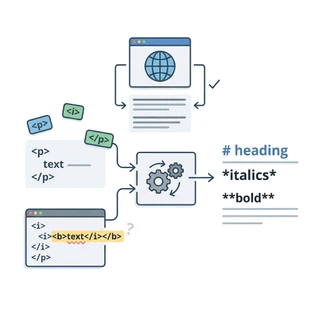 Understanding the underlying translation process reveals exactly why manual editing is a waste of time. Poorly written scripts try to rely on simple find-and-replace commands to change formatting. They search a document for a bold tag and swap it with two asterisks. That primitive method fails the moment it encounters a real-world web page. Web developers constantly nest multiple tags inside each other and apply custom CSS classes that immediately confuse basic scripts.
HTML to Markdown Converter takes a much more analytical approach. It reads the entire document structure at once and builds an internal logical map of the content. This map tracks the relationship between different structural elements. The system knows that a specific piece of text sits inside a list item, which is nested inside an unordered list, which is contained within a main div block. By mapping out these direct relationships, HTML to Markdown Converter accurately translates the formatting without tripping over messy, disorganized code. It ignores proprietary styling classes injected by popular visual page builders and focuses entirely on the semantic meaning of your text.
If a block of text functions as a secondary heading, the system strips away the specific font size definitions, the background color codes, and the alignment instructions. It simply outputs the raw text with two hash marks placed in front of it. This intelligent parsing process separates a reliable html to markdown converter from a broken script. You get clean, readable output regardless of how convoluted the original source code happened to be.
Beating the Alternatives with Better Parsing
Anyone searching for an html to md online tool will run into dozens of different web apps offering similar promises. Most of these alternatives fail under pressure. They rely on outdated parsing libraries that panic when presented with modern HTML5 semantic tags. When a basic converter encounters a formatting tag it does not recognize, it usually breaks the document or leaves raw HTML bleeding directly into your final file. You spend more time manually deleting stray bracket tags than you would have spent typing the text out manually.
 Anyone searching for an html to md online tool will run into dozens of different web apps offering similar promises. Most of these alternatives fail under pressure. They rely on outdated parsing libraries that panic when presented with modern HTML5 semantic tags. When a basic converter encounters a formatting tag it does not recognize, it usually breaks the document or leaves raw HTML bleeding directly into your final file. You spend more time manually deleting stray bracket tags than you would have spent typing the text out manually.
HTML to Markdown Converter handles these edge cases directly. It expects sloppy code. The software knows that web designers frequently forget to close their tags or nest elements incorrectly. It compensates for these common human errors by analyzing the surrounding context of the text block. Instead of crashing and producing a corrupted file, it gracefully falls back to plain text, making sure your words survive the translation process intact.
Processing speed matters just as much as accuracy. Forcing massive text files through a poorly optimized browser script often freezes the active tab. HTML to Markdown Converter handles heavy processing loads instantly. You can paste thousands of words of dense technical documentation into the prompt, and the system translates the entire block in milliseconds. This performance makes it the best html to markdown converter for writers who operate under tight deadlines and refuse to wait on sluggish web tools.
Tackling Tables, Links, and Complex Formatting
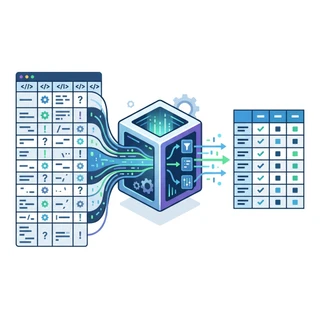
Translating basic paragraphs and standard headers takes minimal processing power. The real technical challenge begins when you attempt to convert html table to markdown formats. Tables resist easy translation into plaintext because they rely on highly specific grid structures. An HTML table uses individual tags for rows, headers, and specific data cells. Markdown tables use vertical pipe characters and horizontal dashes to create a visual text grid.
Basic scripts usually mangle these layouts. They stack the cell contents vertically or delete the table structure altogether, leaving you with an unreadable stack of disjointed words. HTML to Markdown Converter analyzes the specific row and column counts of the original code block. It calculates the necessary padding and rebuilds the grid accurately using standard Markdown syntax. The resulting table aligns perfectly and remains easy to read directly inside your local text editor.
This same level of precise detail applies when you need to convert rich text to markdown. Desktop word processors export text carrying a massive amount of hidden background data. They define font families, line heights, and margin widths for every single paragraph you type. When you paste this rich text into HTML to Markdown Converter, it strips out the visual design definitions but retains the logical structure of your writing. Your bulleted lists stay intact. Your bold and italicized phrases remain properly emphasized. The underlying hyperlink URLs are correctly extracted and wrapped in standard bracket-and-parenthesis syntax. You retain the exact meaning of your document while shedding the heavy visual formatting.
Managing Large Archives and Content Migrations
Website migrations expose exactly how messy long-term content creation gets over time. Moving a long-running blog off an older platform and onto a modern static site generator like Hugo, Jekyll, or Next.js presents a massive formatting hurdle. Older content management systems stored their posts as raw, bloated HTML. Modern publishing workflows demand clean, lightweight text files. You cannot simply copy and paste the old database without breaking the new site layout.
Attempting to migrate these databases manually wastes weeks of productive time. Using HTML to Markdown Converter turns a grueling migration project into a standard, manageable task. You can convert wordpress posts to markdown formats efficiently, bypassing the proprietary shortcodes and broken plugin text that older databases accumulate over the years. WordPress heavily relies on wrapping simple paragraphs in unnecessary div blocks and span tags. HTML to Markdown Converter cuts through this historical bloat to extract the core articles.
For large-scale publishing archives, the ability to bulk convert html to markdown saves an immense amount of manual labor. You export your entire database as standard HTML files, run the raw output through the system, and generate a clean folder of text files ready for your new platform. This conversion process guarantees that years of archived articles remain preserved in a future-proof format. Text files never rely on specific database versions or outdated PHP plugins to render correctly on a screen. By migrating your archives to Markdown, you protect your professional writing from software obsolescence.
Workflow Strategies for Optimal Conversions
While HTML to Markdown Converter excels at cleaning up terrible code, adopting a few simple workflow habits improves your end results. The quality of your source material heavily dictates the quality of the final file. Copying content from a highly interactive, script-heavy web application often causes the clipboard to grab unintended text like navigation menus, sidebar advertisements, or hidden alt-text from user interface buttons.
Before pasting a massive document into the converter, take a moment to isolate the actual article text. Highlight only the main body of the content you want to save. Avoid grabbing sidebars and footer navigation links. This minor adjustment reduces the amount of structural garbage HTML to Markdown Converter has to process, leading to a much cleaner final output. When you convert web page to markdown, limiting the input to the primary text column prevents unwanted menus from cluttering your document.
Always review your image links after completing a major conversion. Web pages frequently use relative URLs for their images. A relative link only points to a folder on that specific server rather than providing the full web address. When you export html to markdown, those relative links might break if you move the text document to a new local environment. HTML to Markdown Converter extracts the exact URL provided in the source code. Doing a quick visual scan of your image tags helps catch these relative link issues before you publish the new document.
If you use note-taking applications like Obsidian, Logseq, or Notion, integrating HTML to Markdown Converter into your daily research habit keeps your workspace fast. Saving web clippings as raw HTML fills your personal knowledge base with unreadable, bloated code. Translating those clippings into Markdown keeps your database searchable, lightweight, and visually consistent across all your devices.
Streamlining Your Digital Workspace
Writers and developers waste too much time fighting with angle brackets and inline CSS. The entire philosophy behind Markdown centers on keeping your hands on the keyboard and your focus fixed on the actual words. Every time you pull information from a website, you risk polluting your local workspace with hidden formatting bugs that will eventually break your layout or corrupt your documents.
Using HTML to Markdown Converter neutralizes that risk entirely. It operates as a strict filter between the chaotic environment of the web and the organized environment of your text editor. It strips away the heavy visual demands of the internet browser and leaves you with the pure semantic structure of your writing.
Whether you need an html to md online tool to grab a quick paragraph from a technical wiki, or you are managing a massive server migration, relying on a smart translation utility changes how you approach writing. You stop worrying about mismatched div tags and broken table rows. You just convert html to markdown and move on with your daily work. Clean text formatting shouldn't be a struggle. HTML to Markdown Converter makes sure it stays simple.